GamePho Controller2.0.2
Publisher Description
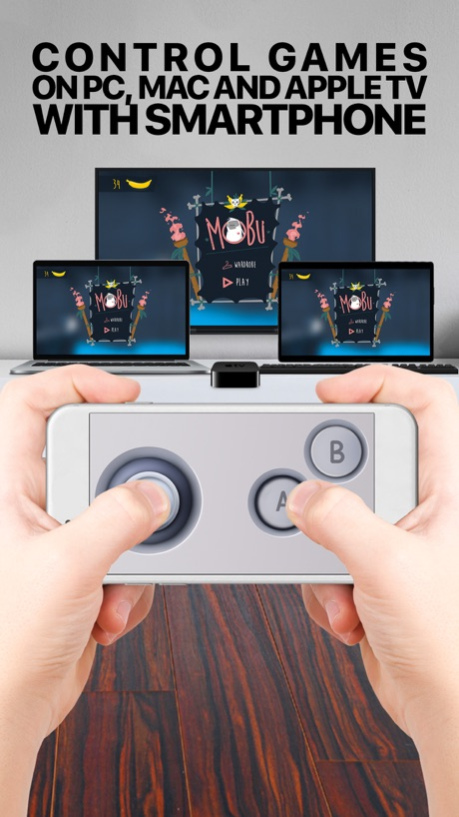


Control compatible games on your TV with your phone
GamePho is the universal game controller app for all games on all platforms. It enables everyone to use smartphones as gamepads to play games on their favorite second screen including Mac, PC, Apple TV and soon more.
_
IMPORTANT: GamePho requires an iPhone and a Mac, PC or Apple TV to function.
_
NOTE: This is only a controller app and does not include any games. You will need to install games on your Mac, PC or Apple TV separately for this app to function.
_
HOW DOES IT WORK?
On Mac and PC:
1-) Visit www.gamepho.com and install companion GamePho Desktop app to your Mac/PC.
2-) Make sure GamePho Desktop app is running and your Mac/PC and iPhone are on the same WiFi network.
3-) GamePho Controller app will discover your Mac/PC automatically and you can connect by tapping the button that will appear on the Connect tab of this app.
4-) Enjoy using your iPhone as a gamepad on your Mac/PC.
On Apple TV:
1-) Install one of the GamePho compatible games on your Apple TV. You will also need to install this app on your iPhone.
2-) Make sure your Apple TV and iPhone are on the same WiFi network.
3-) Launch one of GamePho compatible games on your Apple TV. You can find the list of compatible games such as Fisp.io in the Collection tab of this app.
4-) A button to connect to the game launched will appear on the Connect tab of this app. Once clicked, the controls corresponding to the game launched will be downloaded and will appear on the screen.
5-) Enjoy!
_
Are you a game developer? Check http://www.gamepho.com to learn how to integrate GamePho app to your Apple TV game in minutes.
_
Visit our official site: http://www.gamepho.com
Follow us on Twitter: http://twitter.com/GamePhoApp
For feedback, questions or concerns, please email us at: support@gamepho.com
Oct 16, 2018
Version 2.0.2
- Resolution updates for new devices
- Performance improvements in connectivity
About GamePho Controller
The company that develops GamePho Controller is Alictus. The latest version released by its developer is 2.0.2. This app was rated by 1 users of our site and has an average rating of 3.0.
To install GamePho Controller on your iOS device, just click the green Continue To App button above to start the installation process. The app is listed on our website since 2018-10-16 and was downloaded 372 times. We have already checked if the download link is safe, however for your own protection we recommend that you scan the downloaded app with your antivirus. Your antivirus may detect the GamePho Controller as malware if the download link is broken.
How to install GamePho Controller on your iOS device:
- Click on the Continue To App button on our website. This will redirect you to the App Store.
- Once the GamePho Controller is shown in the iTunes listing of your iOS device, you can start its download and installation. Tap on the GET button to the right of the app to start downloading it.
- If you are not logged-in the iOS appstore app, you'll be prompted for your your Apple ID and/or password.
- After GamePho Controller is downloaded, you'll see an INSTALL button to the right. Tap on it to start the actual installation of the iOS app.
- Once installation is finished you can tap on the OPEN button to start it. Its icon will also be added to your device home screen.
Program Details
System requirements
Download information
Pricing
Version History
version 2.0.2
posted on 2018-10-16
Oct 16, 2018 Version 2.0.2
- Resolution updates for new devices
- Performance improvements in connectivity
version 2.0
posted on 2015-11-18
version 2.0.2
posted on 1970-01-01
2018年10月16日 Version 2.0.2
- Resolution updates for new devices
- Performance improvements in connectivity
version 2.0.2
posted on 1970-01-01
16. Okt. 2018 Version 2.0.2
- Resolution updates for new devices
- Performance improvements in connectivity
